






The NUX MG-400 is a value-packed modeller akin to its little brother, the MG-300. MG-400 houses 2 powerful DSP chips for high-definition White-Box Amp Modeling algorithm (TS/AC-HD) and Core-Image post-effects. Since releasing the MG-300, people have been blown away by the sound and playability, not to mention the ease-of-use, tone tweaking and intuitive interface.
And now, the MG-400 builds upon the MG-300 feature set, moveable signal blocks, 12 IR COLLECTION slots, flexible P.L block with MIN & MAX parameter setup, abundant SYSTEM MENU, and physical MASTER volume knob. The MG-400 is now the best value modeler for the money.


Same Amp Modeling Algorithm as MG-300, for easy Tone Tweaking
The White-box Amp Modeling & Pre-Efx algorithm offers realistic playability and analog-chaos response.
The concept of “Chaos makes the muse” perfectly applies to the analogue circuit. When you tweak the knob, it affects itself as well as other parameters. For a linear digital system, the parameter is independent. The white-box algorithm offers real-time feedback, increment-by-increment. NUX TS/AC-HD replicates the same playability most guitarists crave in a real tube amplifier.


512 samples IR resolution and a USER slot with each patch. (additional 12 IR COLLECTION slots)
The MG-400 includes multiple impulse responses of 512 samples each. You can load 3rd party IR files using our NUX QuickTone edit software (supports up to 48kHz sample rate). The included 25 guitar cabinet IRs combine 4 classic microphones with 3 mic positions to allow beginners a quick and easy way to jump into the multi-effects experience. Also included are 8 bass cabinet IRs and 3 acoustic guitar IRs, giving you the ability to play bass guitar on MG-400 or use an electric guitar to simulate acoustic guitar sound with acoustic guitar IRs.


NG, CMP, EFX, AMP, IR, EQ, MOD, DLY, RVB, P.L | 10 independent moveable signal blocks.
You can move signal blocks freely on the MG-400 and/or QuickTone editing software. Set the PATCH LEVEL block in front of AMP to swell the volume. Put a DELAY block in front of the gain stage to create grooving riffs. There are lots of tone creations with the flexible block routing.
Since Firmware V2.1.1, you can hold the signal block to switch: CMP<–>EFX, EFX<–>MOD, MOD<–>EFX, RVB<–>DLY. Therefore, you can stack 2 Delays at the same time, or stack the CMP or 2 EFXs (OD/DIST) at the same time!


2.8″ 320*240 color LCD with intuitive UI.
An intuitive user interface with a colorful LCD lets you get rid of reading manuals. Keep it Simple!

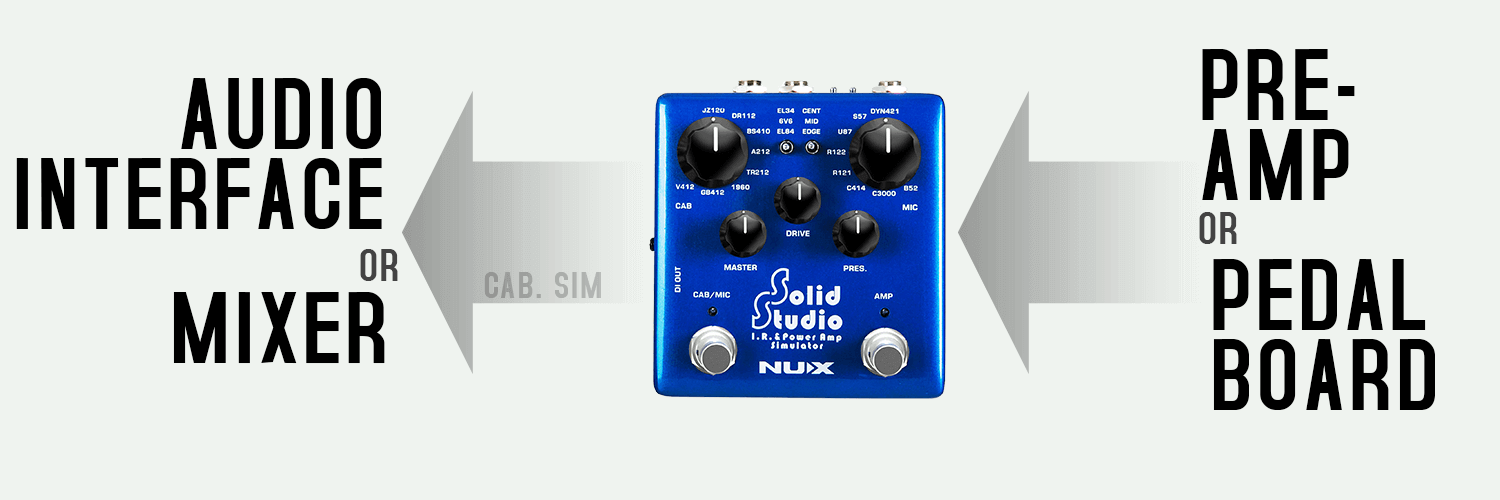
– Solid Studio is good for sitting between your pedals and audio interface for silent direct recording. Let the Solid Studio handle the speaker cabinet and microphone part.
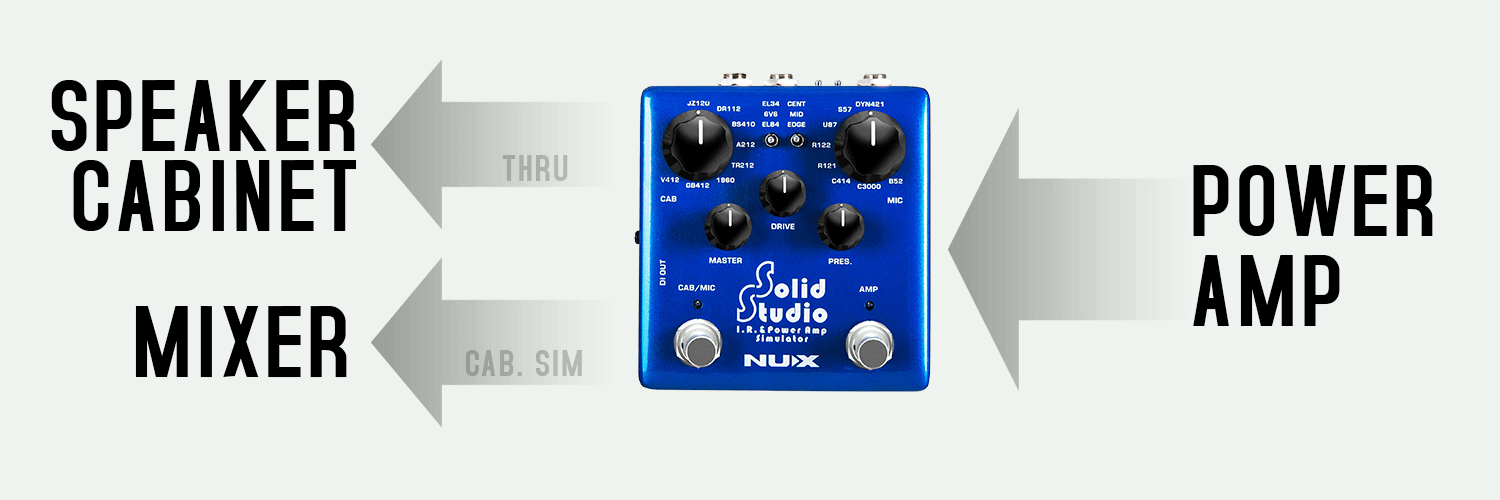
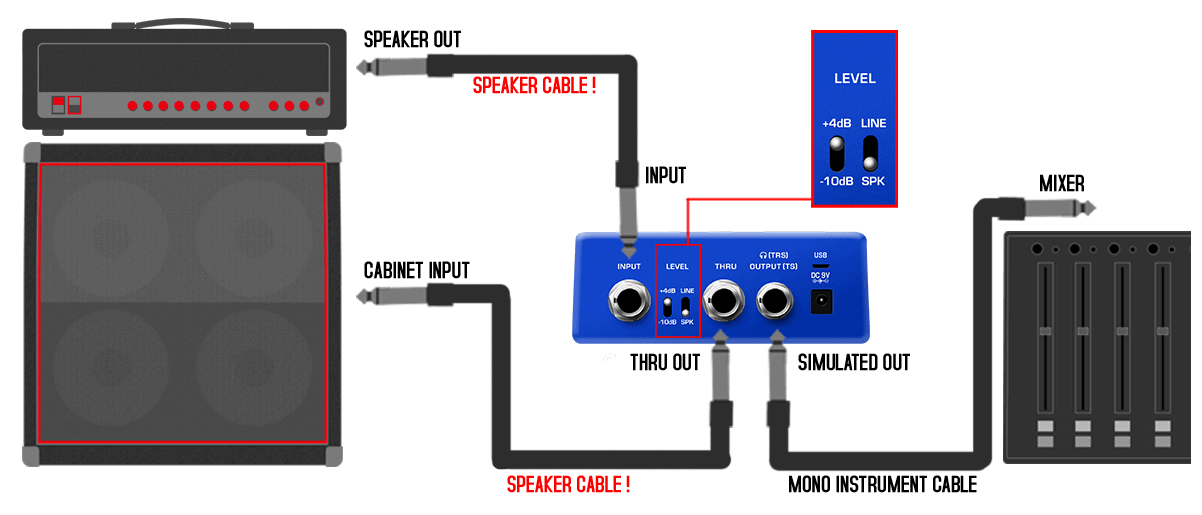
– By placing the Solid Studio between the amp and the cabinet, while still using your real cabinet for stage monitoring, you can split a DI signal with cabinet simulation to the mixer from Solid Studio. The Solid Studio DOES NOT provide a load to the amplifier; therefore, a real cabinet or a loadbox MUST be connected to the THRU jack of the Solid Studio, or there is risk of damaging the amplifier.
– The amplifier’s speaker output must be connected to the Solid Studio’s input by a SPEAKER CABLE.
– The Solid Studio’s input mode must be switched to +4dB.
– The Solid Studio’s THRU output must be connected to the speaker cabinet’s input by a SPEAKER CABLE.
– The Solid Studio’s output mode must be selected as SPK (SPEAKER).
You can easily emulate the sound of any guitar cabinet by loading different IR (Impulse response) files to NUX Solid Studio.
The Solid Studio’s IR resolution is 2048 samples and 46ms, which is higher than the common quality standard that most of the IR loaders are using today: 1024 samples and 20ms capturing length. Some well-known profiler devices offer 2048 samples / 40ms length.
What makes the Solid Studio stand out? It offers 46ms length, which means it can perfectly read all the frequencies. Comparing the length, 20ms is already enough to capture a sound profile with an efficient result, but it’s not enough to catch the lower frequencies. That’s why devices with high-quality usually provide 40ms length – it means higher resolution and better quality.
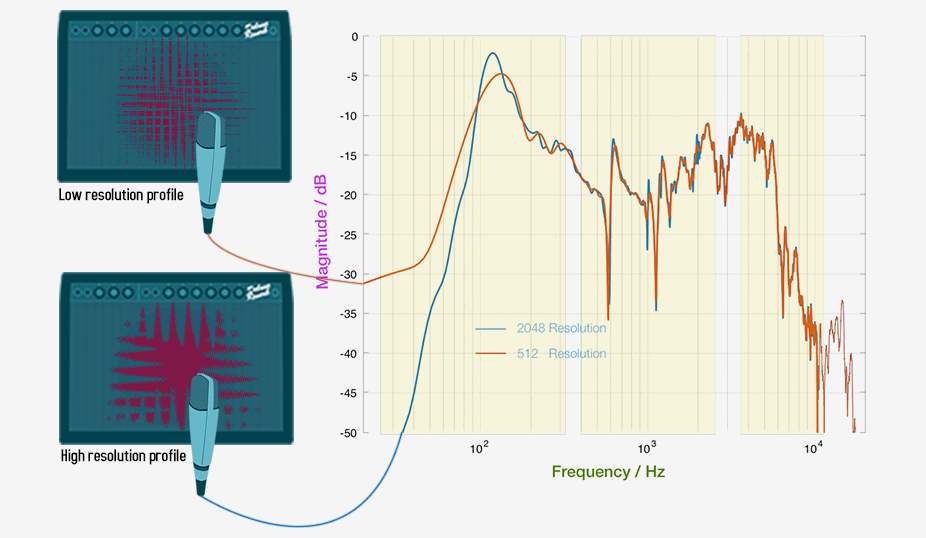
The highest resolution quality limit of the IR is 50ms; it is the REAL sound. Considering all the processes on the signal from your guitar to your ear, Solid Studio delivers the signal faster than the blink of an eye with the greatest result. Thanks to Solid Studio’s high-quality processor and perfect algorithm, the signal latency from input to output is less than 1ms.
Many of the IR loaders’ signal latencies are around 2ms, and each additional digital pedal in the signal chain also increases the latency. For example, the fastest multi-effect pedal needs 2ms to deliver the sound. If you use an IR loader together with this multi-effect pedal, the total latency will be 4ms, and a guitar player can ~barely~ feel that. If it’s more than 5ms, it’s obviously slow, and it’s not able to play.
You can capture any speaker’s profile easily with Solid Studio. Create your own IR file and save it.
First, make all the connections (you can see the picture below):
– Adjust the microphone position and connect to the Mic Preamp.
– Mic Preamp Output to Solid Studio Input.
– Solid Studio Output to Power Amp in / Return.
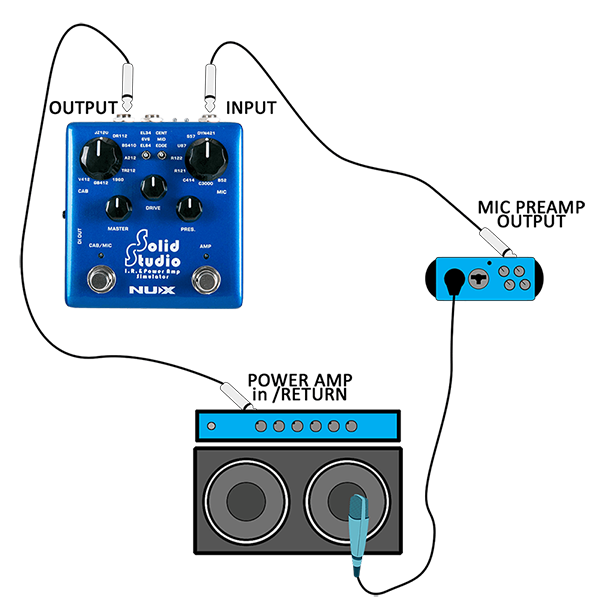
Now follow these steps:
– Push and hold both footswitches on Solid Studio and plug in the power cable. Solid Studio will start running in IR capturing mode
– Select the save position on Solid Studio, you can dial up any preset you want. Choose a speaker cabinet, mic position and a microphone (and please note it). This will be your preset recall position as long as you keep the file here. 8 Speaker Cabinets x 3 Microphone positions x 8 Microphones = 192 dial up positions
– Press CAB/MIC footswitch ~ and it will capture the profile. Usually it takes couple of seconds, just wait until the LED’s stops blinking.
Your very own Impulse Response file is ready to rock!
Use SCENES to engage/disengage blocks with either CTRL footswitch.
You can assign CTRL1 or CTRL2 to trigger the SCENE Functionality. Each preset has 3 scenes, which are snapshots within a preset. This is a powerful function for live gigs. Each SCENE can engage/disengage signal blocks freely, and it retains the DELAY / REVERB trails when you disengage them with SCN CTRL.

Perfect for Playing and Singing
The MG-400 supports NUX Phrase Loop Synchronization with Rhythm. You can play the rhythm then record your phrase loop. MG-400 will automatically beat match the phrase to fit the current rhythm BPM.
*Choose either STEREO / MONO looping. (Stereo is 30 seconds, mono is 60 seconds.)
Two Recording Modes
*NR = Normal Recording works as regular loop function, while you press CTRL1(LOOP) footswitch, it starts to record the phrase loop.
*AR = Auto Recording will stand by while you press CTRL1(LOOP) footswitch, once you hit the strings, it will start to record your phrase loop.

You can download the QuickTone™ editor from the MG-400 product page. An intuitive interface is provided for tweaking parameters, dragging block order, setup SCN, save patches, load patches, export patches, load IRs, set up USB routing and CTRL SETTING; all by simply using QuickTone™.


For home studio and silent practice, the MG-400’s USB audio capabilities makes it the Swiss Army Knife of guitar audio interfaces. Connect it via USB to your PC, and you can record tracks, reamp, and even do livestreaming with the MG-400.

In Normal mode, you can choose Loopback to play the playbacks from PC when doing a live stream.
Re-amp: MG-400 offers Dry Out and Re-amp recording applications.
| Attribute | Specification |
|---|---|
| Display | 2.8” Color LCD (320×240) |
| Modeling Technology | TSAC-HD (White-Box) & Core-Image |
| Amp Models | 25 Guitar Amps, 2 Bass Amps, 1 Acoustic Amp |
| IR Resolution | 512 Samples (User Slots available) |
| Signal Blocks | 10 Flexible Routing Blocks (NG, CMP, EFX, AMP, IR, EQ, MOD, DLY, RVB, P.L) |
| Audio Interface | USB Audio (Re-amp support) |
| Looper | 60-Second Mono (30-Second Stereo) with Drum Machine |
| I/O | 1/4″ In, 1/4″ L/R Out, Phones, Aux-In |
| Power | 9V DC (Negative Tip) / USB for QuickTone Editor |
| Dimensions | 289(L) * 160(W) * 71(H) mm |
| Weight | 920g |


